
If you’ve been keeping an eye on the world of AI-generated art and video lately, you’ve likely seen the name Dreamina AI popping up everywhere. Developed by ByteDance—the same creative giant behind TikTok and CapCut—Dreamina is making serious waves. But as with any high-end AI tool, the first question everyone asks is: Is Dreamina AI free?
The short answer is: Yes, but with a catch.
In this deep-dive article, we’re going to look past the marketing fluff. We’ll explore how the free tier works, what you can actually do with the Dreamina AI video generator, and whether the “Pro” version is worth your hard-earned money.
Table of Contents
What is Dreamina AI ?
Before we talk about money, let’s talk about what this tool actually is. Dreamina is a multi-modal AI platform. While many tools focus on just images (like Midjourney) or just video (like Runway), Dreamina tries to do it all in one cohesive workspace.
It allows users to generate high-quality images from text prompts, edit them with a powerful “Canvas” feature, and—most impressively—transform those images into motion using the Dreamina AI video generator. Because it’s a ByteDance product, it feels intuitively designed for content creators, social media managers, and YouTubers who need quick, high-impact visuals.
Breaking Down the “Free” Part: How the Credit System Works
Dreamina doesn’t use a “unlimited free” model. Instead, it operates on a Daily Credit System. This is actually great news for casual users, but it can be a bit of a hurdle for “power users.”
1. The Daily Allowance
Currently, Dreamina provides users with a set amount of free credits every single day. Usually, this is around 60 to 150 credits (though ByteDance frequently adjusts these numbers based on promotions). Unlike other platforms where credits expire at the end of the month, Dreamina’s free credits refresh every 24 hours.
2. What Do These Credits Get You?
To give you an idea of the value:
- Image Generation: Typically costs 1 credit per set of images.
- Upscaling: If you want to make your image high-resolution for printing or 4K screens, it will cost extra credits.
- Video Generation: Using the Dreamina AI video generator is the most “expensive” action on the platform, often costing significantly more credits than a simple image.
3. The “Free Forever” Myth
While you can use Dreamina for free every day, you are limited by these credits. If you are working on a big project and run out of credits at 10:00 AM, you have to wait until the next day to continue—unless you upgrade to a paid plan.
Dreamina AI Video Generator
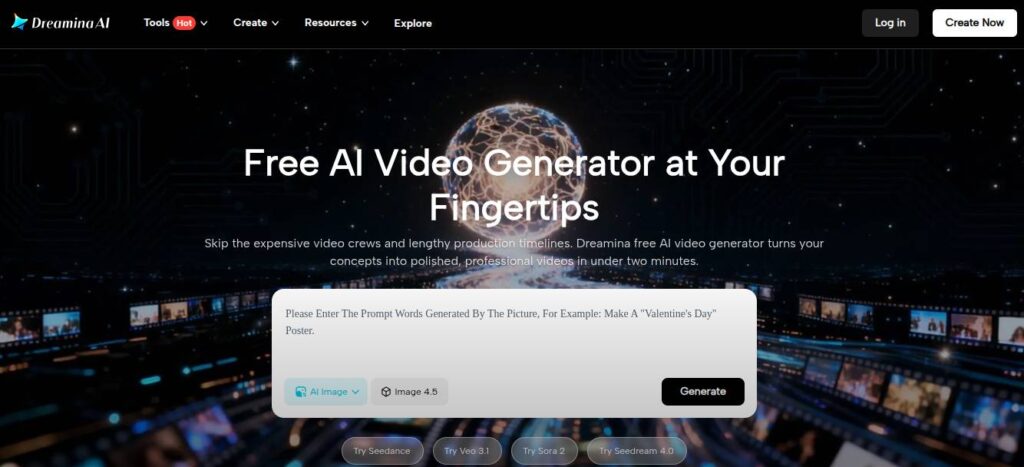
One of the biggest reasons people are flocking to this platform is the Dreamina AI video generator. In a world where video is king on platforms like Instagram and TikTok, being able to create cinematic clips from a simple text prompt is a superpower.
How Does the Video Tool Work?
Dreamina offers two main ways to create video:
- Text-to-Video: You describe a scene (e.g., “A futuristic cyberpunk city with neon lights reflecting in the rain”), and the AI builds it from scratch.
- Image-to-Video (Animation): This is where Dreamina really shines. You can upload a photo—perhaps a portrait or a landscape—and use the “Animate” feature to add realistic motion. You can even control the “Motion Strength” to decide if you want a subtle breeze or a chaotic storm.
Why It’s Better Than Many Free Competitors
Most free AI video tools leave a massive, ugly watermark right in the middle of your video. While Dreamina’s free tier has limitations, the quality of the video—the fluid motion and the lack of “glitchy” AI artifacts—is currently among the best in the industry.
Also Read: Poly-AI Is This the Best AI Character Chatbot in 2026?
Dreamina AI: Free vs. Paid (Is the Pro Plan Worth It?)
If you’re considering using Dreamina for your business or a serious side-hustle, the free credits might start feeling a bit tight. Here is how the paid version usually stacks up against the free tier.
| Feature | Free Tier | Pro / Paid Tier |
| Daily Credits | Limited (60-150) | Significantly higher or “Boosted” |
| Generation Speed | Standard (may wait in queue) | Priority (Faster rendering) |
| Resolution | Standard | Ultra-HD / 4K Options |
| Commercial Rights | Restricted / Personal use | Full Commercial Usage |
| Advanced Tools | Basic Canvas tools | Deep editing & In-painting |
Who should stay on the Free plan?
If you are a hobbyist making memes, cool wallpapers, or just experimenting with AI for fun, the free plan is more than enough. By logging in every day, you can accumulate a massive library of AI art without ever touching your credit card.
Who should upgrade?
If you are a freelancer, YouTuber, or Agency owner, the Pro plan is a no-brainer. The ability to generate videos without waiting in a “render queue” and the legal safety of commercial rights are essential for professional work.
Step-by-Step: How to Use Dreamina AI for Free
Getting started is actually quite simple. Follow these steps to maximize your daily credits:
- Sign Up via Web: Go to the official Dreamina website. You can usually sign in using your Google account or TikTok account.
- Claim Your Credits: Check your profile icon to see how many credits you have for the day.
- Start with “Text-to-Image”: Type a descriptive prompt. Instead of “a dog,” try “A golden retriever wearing a space suit on Mars, cinematic lighting, 8k.”
- Use the “Canvas”: If you don’t like a specific part of the image, use the Canvas tool to “erase” and “re-generate” that specific area. This saves you from wasting credits on a whole new image.
- Animate: Once you have an image you love, click the “Video” or “Animate” button to see the Dreamina AI video generator in action.
Tips to Save Your Credits (Don’t Waste Them!)
Since you only get a handful of credits each day, you need to be smart. Here is how I manage mine:
- Be Specific with Prompts: The more vague your prompt, the more likely you’ll get an image you hate. A wasted image is a wasted credit. Use adjectives, lighting descriptions, and camera angles.
- Use the “Reference Image” Feature: Instead of letting the AI guess what you want, upload a basic sketch or a photo with the layout you like. This helps the AI hit the mark on the first try.
- Check the Settings: Before clicking “Generate,” check the aspect ratio. If you generate a square image but needed a vertical one for a Reel, you’ve just spent a credit unnecessarily.
How Does Dreamina Compare to Other Tools?
You might be wondering: “Why should I use Dreamina when Midjourney or Leonardo AI exist?”
- Dreamina vs. Midjourney: Midjourney is widely considered the “King” of image quality, but it has no free tier anymore. It also lives inside Discord, which some people find annoying. Dreamina has a beautiful, standalone web interface and a free daily option.
- Dreamina vs. Leonardo AI: Leonardo is very similar to Dreamina with daily credits. However, Dreamina’s integration with the ByteDance ecosystem (like CapCut) makes it superior for video creators.
- Dreamina vs. DALL-E 3 (ChatGPT): DALL-E is great at following instructions but often looks a bit “plastic” or “cartoony.” Dreamina produces more photorealistic and cinematic results.
Can You Use Dreamina Images for Your Blog?
This is a grey area in the AI world. Generally, if you are on the free plan, ByteDance grants you a license for personal, non-commercial use. This means you can post them on your personal social media or use them as your phone wallpaper.
However, if you want to use these images for a book cover you’re selling, an ad campaign, or a monetized website, you usually need to be on a paid subscription. Always check the latest Terms of Service on their website, as AI copyright laws are changing faster than the technology itself!
Final Thoughts: Is It Worth It?
So, is Dreamina AI free? Yes, it is one of the most generous high-quality AI tools currently available. The fact that you get a “fresh start” with credits every single morning makes it a top-tier choice for creators on a budget.
The Dreamina AI video generator alone makes it worth a bookmark in your browser. While the transition from “free” to “paid” will eventually be necessary for professionals, the current free model is a fantastic way to learn the ropes of AI prompting without spending a cent.
The Verdict: If you want professional-grade visuals without the professional-grade price tag, Dreamina AI is arguably the best tool to explore in 2026.
Ready to try it out?
Go to the Dreamina website today, claim your first batch of credits, and see what your imagination can build. You might just find that your next viral video was only a text prompt away.