
Ever felt like the world of AI is moving so fast it’s hard to keep up? One day everyone is talking about ChatGPT, the next it’s Midjourney, and before you know it, there are a thousand new tools on the scene.
If you’re looking for a simple, no-fuss way to jump into AI—whether it’s to generate a cool image for your blog or just to have a smart conversation—you’ve likely stumbled across Deep AI.
But is it actually any good? Does it live up to the hype? In this deep-dive review, I’m going to walk you through everything you need to know about DeepAI, from its famous image generator to its handy chat features.
Table of Contents
What is Deep AI?
At its core, Deep AI is an all-in-one AI platform designed to make artificial intelligence accessible to everyone. Founded back in 2016, it was actually one of the very first tools to offer an AI image generator directly in your web browser.
While other tools can feel a bit technical or require you to join a Discord server (looking at you, Midjourney), DeepAI keeps things refreshingly simple. You go to the website, type what you want, and hit “Generate.”
It’s built for creators, hobbyists, and developers who want results fast without a steep learning curve.
Also Read: Veo 3.1: The Ultimate Guide to Google’s Powerful AI Video Revolution
Deep AI Image Generator: Your Personal Artist
The star of the show is undoubtedly the Deep AI image generator. If you’ve ever had a vision for a picture but lack the drawing skills to make it happen, this tool is like having a digital artist on standby 24/7.
How it works
You simply enter a “prompt”—a fancy word for a description—like “A futuristic city with neon lights and flying cars.” You pick a style (like Cyberpunk, Impressionism, or 3D Render), and the AI gets to work.
Why people love it:
- Speed: It produces images almost instantly.
- Style Variety: With over 100 styles to choose from, you can go from a gritty oil painting to a cute 3D cartoon in one click.
- Ease of Use: You don’t need to be a “prompt engineer” to get something that looks decent.
Pro Tip: If you want better results, be specific! Instead of typing “a dog,” try “a golden retriever puppy playing in a sunlit field with a blurry background.”
Talking to the Machine: Deep AI Chat
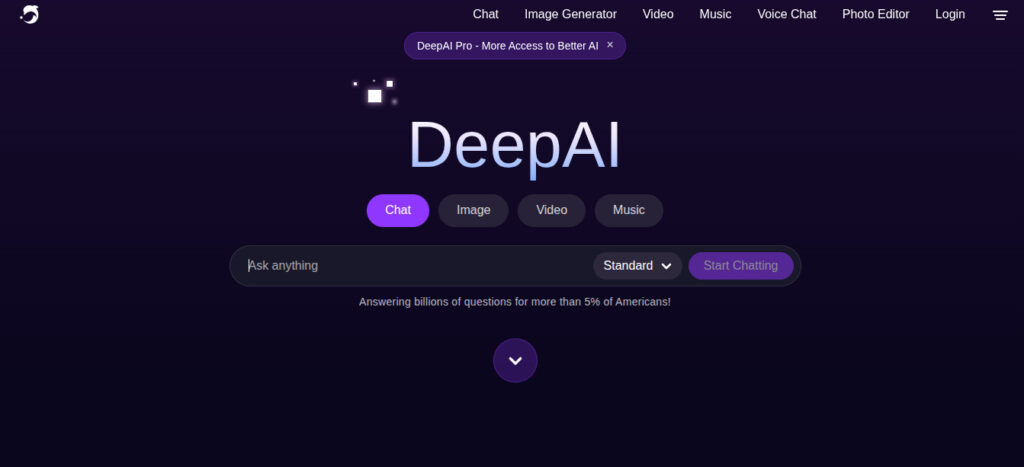
Beyond art, the platform offers Deep AI chat. If you’ve used ChatGPT, this will feel very familiar. It’s an AI buddy that can help you write emails, explain complex science topics, or even write computer code.
Deep AI Chat vs. ChatGPT
You might be wondering: “Why use this instead of the famous ChatGPT?” While Deep AI chatgpt-style features might not be quite as “human-sounding” as OpenAI’s latest models for long-form essays, it has some unique perks:
- Special Modes: It offers specific “Characters” you can talk to.
- Online Genius: A mode that allows the AI to browse the live web for current information (not just old data).
- Math Mode: Great for students or researchers who need help with formulas.
Deep AI Chat Free: What’s the catch?
You can use Deep AI chat free of charge, but there are limits. Usually, you get around 300 messages per day on the free tier. For most casual users, that’s more than enough!
Real-Life Use Cases: How Can You Use It?
Not sure how this fits into your life? Here are a few ways I’ve seen people use DeepAI effectively:
- Bloggers & Social Media Managers: Generating unique header images or “eye-catchy” Instagram posts without worrying about copyright.
- Small Business Owners: Using the chat tool to draft product descriptions or social media captions.
- Teachers & Students: Using the text summarizer to condense long articles or creating visual aids for presentations.
- Developers: Using the DeepAI API to add AI features directly into their own apps or websites.
The Good and The Bad: An Honest Take
No tool is perfect. Here is my “no-nonsense” breakdown of what I like and what I don’t.
The Pros ✅
- No Login Required: You can actually try the image generator without even making an account.
- Affordable: At roughly $5 a month, it’s significantly cheaper than Midjourney or ChatGPT Plus.
- User-Friendly: The interface is clean and doesn’t overwhelm you with buttons.
- All-in-One: Having chat, image, and video in one place is very convenient.
The Cons ❌
- Quality Consistency: Sometimes the images can look a bit “wonky” (like extra fingers on a hand) compared to high-end tools.
- Public by Default: On the free plan, everyone can see what you generate. Not great for private business ideas.
- Basic Text: The chat is great, but for very long, complex creative writing, ChatGPT still has the edge.
Also Read: Amazing Perks of Character AI You Need to Try in 2026
FAQs: Everything You’re Asking
1. Is Deep AI safe to use?
Yes, DeepAI is a legitimate company that has been around for nearly a decade. They don’t ask for unnecessary personal data, and their payment systems are secure.
2. Can I use Deep AI images for commercial purposes?
Yes! According to their terms, you generally own the rights to the images you create. However, keep in mind that AI copyright laws are still evolving, so it’s always good to stay updated.
3. Does Deep AI offer a mobile app?
While they don’t have a dedicated “app store” app for every platform, the website is fully mobile-optimized. You can use it perfectly fine on your iPhone or Android browser.
4. What is “Genius Mode”?
Genius Mode is their premium version of the AI. It uses more “brainpower” to follow your instructions more accurately and produce much higher-quality images and smarter chat responses.
5. Can Deep AI generate videos?
Yes, but it is currently a Pro feature. It’s great for creating 5-8 second clips for social media or “mood boards.”
Final Thoughts: Should You Try Deep AI?
If you are a beginner looking to dip your toes into the world of AI without spending a fortune or learning complicated software, Deep AI is a fantastic choice.
It’s fast, friendly, and surprisingly powerful for its price. While it might not replace professional-grade tools for high-end graphic designers, it’s a “Swiss Army Knife” for the rest of us.
Whether you need a quick deep ai image for a project or want to spend an hour in a deep ai chat session brainstorming your next big idea, it’s well worth a bookmark.
What are you planning to create first? Drop a comment below—I’d love to hear about your AI adventures!